Sunday, February 2, 2014

PixelPets Plugin 1.7.4

PixelPets Plugin 1.7.4

What is this?

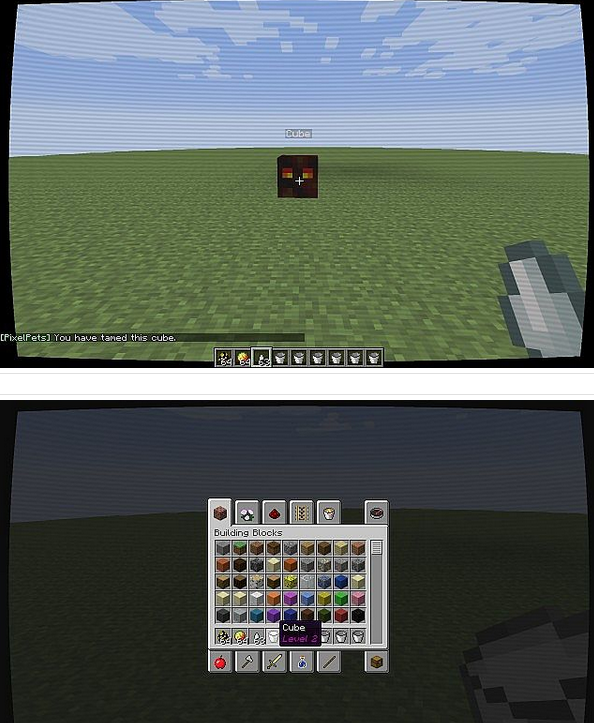
After setting up a plugin workspace two days ago and learning a lot, I have made and published my first ever plugin, so please bear with me. Basically, Magma Cubes are still hostile but you can tame them, level them up to make them grow and pick them up and carry them round with you.

How does it work?

• To tame a cube, give it a Ghast Tear.
• For a chance to make your cube level up, give it a Magma Cream. There is a one in (Cube Level) x 64 chance of it leveling up, so it is difficult.
• To pick your cube up, right click it with a bucket.
• To place your cube, empty the bucket onto the ground (by right clicking).
• To teleport tamed cubes in the same world as you, right click a blaze rod.
How do I install it?

• First of all, you will need a Bukkit server, since it is a Bukkit plugin.
• Download the file and upload it to your plugins folder on the server
• Restart the server or login to it and execute /reload.
What’s next?

• Riding your cube(s).
• More ways to level them up.
• Custom textures!
I love this thing!

• Diamond if you like it.
• Favourite if you love it.
• Comment if you think I can improve it (it can always be better).
• Subscribe if you want more!
Permissions

• You may use the plugin as it is, but not modify the source code.
• You may make reviews, as long as they link back to this page.

RuneScape Pack

As the name would suggest this is a texture pack based off the popular MMORPG RuneScape.


Version: Minecraft 1.7 | Resolution: 64x64


Ovo’s Rustic Pack

Ovo’s Rustic Pack is a beautiful and incredibly detailed 64×64 texture pack with a medieval feel.


Wayukian Pack Texture

Wayukian is a 16×16 texture pack with lots of detail and an RPG feel. The pack also has some awesome custom armour and nether textures.


Download WayukianPack_9.zip 

Better Villages Mod 1.7.2, 1.6.4, 1.6.2, 1.5.2

What Better Villages Mod does?

This mod fixes the spawning of villages to more frequently and they are closer together when you do find them much like you would in reality.  While traveling through Minecraft you might stumble upon a lone village, sometimes spawned in at a precarious area, leading to some insane village generation.  Villages in Vanilla have gotten a little better but Better Villages ramps it up even more!  Villages spawn more tightly together like a town, they spawn in Jungle biomes, Mountains and even in the ocean!  Gardens within the villages are also fixed, adding lily pads and gates to the fences, even torches for light.  The lamps around the villages use glowstone instead of torches, giving a lot more light at night time.

Features:

  • Villages now spawn in every biome that has a little flat land.
  • Villagers have betters AI.
  • Villages spawn 5 or more houses.
  • Villages extends land into flat land.
  • Villages break apart any block in the way.
  • Villages break blocks 75 blocks above them (trees etc.)
  • Villagers have a low chance of attacking a zombie, still working on it, but cool!
  • Villages no longer have a weird generation with gravel.
  • Biomes now have a fixed spawn-rate so there won’t be like 500 villages in one single biome on LargeBiomes generation and default world.
  • Villagers now walk on terrain like nothing before! They can detect where they walk.
  • Villagers will attack zombies ONLY if the Golem Spawn Rate is below 10%. Which is extremely rare.
  • Villages spawn in literally every single biome except ‘The End Biome’!
  • Added new GUI in the In-Game menu.
  • Updated to MC 1.5.2.
  • Jungle/Swamp/Ice Villages!
  • New GUI.


How to install Better Villages Mod:

  • Download and install Minecraft Forge
  • Download zip file
  • Drag the every single class file inside your minecraft.jar
  • Drag BetterVillages.cfg into the .minecraft directory
  • Remember to put singleAI into minecraft.jar as well
  • Done
Changelogs:
v0.3
  • Updated for 1.7.2
  • Changed config option to use block names
  • Added support for all new biomes
  • Changed into jar file

Mod Download Links:

For 1.5.2
Link 1 

For 1.6.2
link 1
For 1.6.4
link 1
For 1.7.2
link 1

Cyberghostde’s HD Resource Pack 1.7.4/1.7.2/1.6.4

Cyberghostde’s HD Resource Pack 1.7.4/1.7.2/1.6.4


Resolution: 64x, 128x, 256x

developer :cyberghostde
Compatible : Minecraft 1.7.4, Minecraft 1.6.4, Minecraft 1.7.2
Last Updated : Jan 28, 2014


How to install Cyberghostde’s HD Resource Pack for Minecraft
In order to use HD Resource packs properly (32× and higher) you will need to either patch your Minecraft usingMCPatcher or using OptiFine. Optifine is preferred as it includes all of the features of MCPatcher, and greatly increases game speeds and graphics settings. MCPatcher tends to be updated on the same day as Minecraft updates, so use it instead if you are in a hurry.

Kradxn’s X-ray Mod for Minecraft 1.7.2, 1.6.4 and 1.6.2


How to use:

  • Just press X to toggle ON/OFF (Key can be set in Minecraft config menu)
  • To edit the Ores and the color just press F6

How to install Kradxn’s X-ray Mod for Minecraft:

  • Download and install Minecraft Forge
  • Download mod zip file
  • Put zip file into your /.minecraft/mods folder. Do not unzip it. If you don’t have a mods folder, create one
  • Done
Changelogs:
v2.01
  • Bug-Fixes
v1.11
  • Fixed some Bugs (Edit-Button not editing,Render not updating(may take 4 seconds))

Kradxn’s X-ray Mod Download Links:

For 1.6.x
ZIP version
http://www.dl.9minecraft.net/index.php?act=dl&id=1379242766
http://www.dl2.9minecraft.net/index.php?act=dl&id=1379242261
JAR version (for MAC)
http://www.dl.9minecraft.net/index.php?act=dl&id=1379242790
For 1.7.2
http://www.dl2.9minecraft.net/index.php?act=dl&id=1391223902
http://www.dl4.9minecraft.net/index.php?act=dl&id=1391223098